M1200 and M2200 portable power stations
The M1200 (1,030 Wh) and M2200 (2,240 Wh) are plug-and-play LiFePO4 power stations. You switch on the port you need, plug in the device, and recharge from the wall, from solar panels or from a car. This guide follows the English section of each official user manual. Pick your model in the tabs.
The SRP flyer in Drive (June 2026) lists the portable stations as "M1800" and "M2400". The specs printed next to those names (1,030 Wh / 1,800 W and 2,240 Wh / 2,400 W) match the M1200 and M2200 in the manuals and datasheets. The flyer names seem to come from the AC output rating, not the model number. Check with the customer which unit they mean, and quote the model on the box (M1200 / M2200).
Both manuals say they cover the version "with an AC output range of 200V-240V/50Hz", and the datasheets list AC input and output as 220–240 V @ 50 Hz. The Philippine grid is 60 Hz, and the documents do not mention 60 Hz operation. Confirm 60 Hz compatibility of the stock you are selling with Silvera Solar Power / MARSTEK.
1. Ports, screen and buttons
- M1200
- M2200
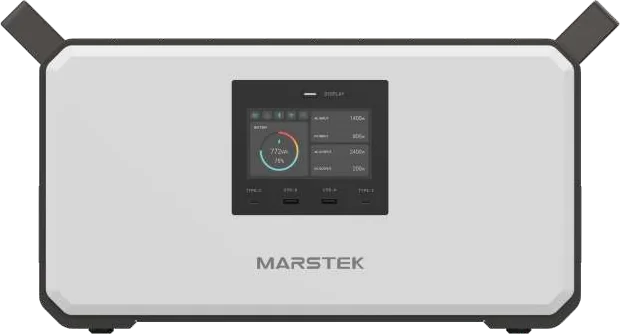
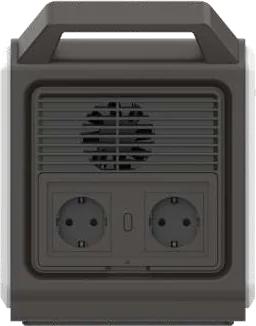
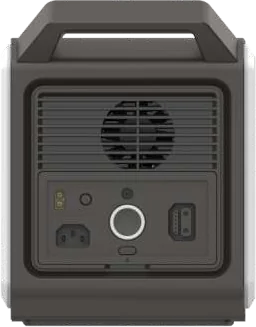
Inputs (manual):
| Input | Rating |
|---|---|
| AC input | Up to 1,200 W |
| Solar via XT60 | Up to 800 W, 12–59 V |
| Vehicle (car) input | Up to 120 W |
Outputs (manual):
| Output | Rating |
|---|---|
| AC × 2 | 1,800 W rated, 3,600 W peak |
| USB-C1 | Up to 100 W (PD) |
| USB-C2 | Up to 45 W (PD) |
| USB-A × 2 | Up to 18 W each |
| Car charger / DC output | Up to 12 V / 10 A (shared) |
Other parts shown in the manual: resettable overload protection switch, AC output switch, heat-dissipation fan, extra battery port. The manual says "Extra battery need to buy separately".
- AC input: the manual says 1,200 W. The datasheet spec table and cover both say 1,000 W max (220–240 V @ 50 Hz).
- Dimensions: the manual says 462.7 × 195 × 247.8 mm. The datasheet says 400 × 195 × 200 mm. Both documents agree on 1,030 Wh, 14 ± 0.5 kg and 1,800 W AC output. Quote the conservative 1,000 W AC input until MARSTEK confirms which figure is correct.
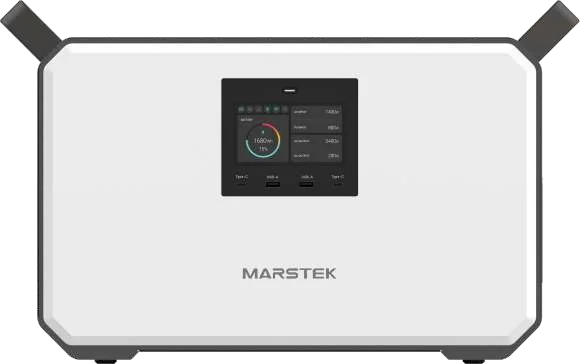
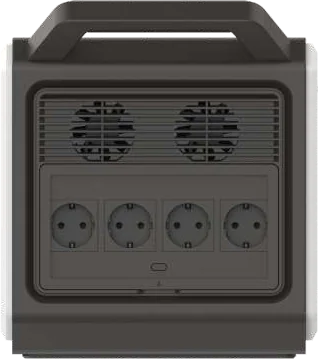
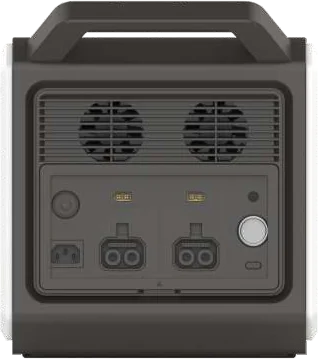
Inputs (manual):
| Input | Rating |
|---|---|
| AC input | Up to 2,000 W |
| Solar via XT60 | Up to 600 W × 2 (12–59 V). The manual's charging section says "solar panels up to 1200W" |
| Vehicle (car) input | Up to 120 W |
Outputs (manual):
| Output | Rating |
|---|---|
| AC × 4 | 2,400 W rated, 4,800 W peak |
| USB-C1 | Up to 100 W (PD) |
| USB-C2 | Up to 45 W (PD) |
| USB-A × 2 | Up to 18 W each |
| Car charger / DC output | Up to 12 V / 10 A (shared) |
Other parts shown in the manual: resettable overload protection switch, AC output switch, heat-dissipation fan, extra battery port. The datasheet drawing shows 2 external battery ports and labels the main switch "Touch-sensitive Switch".
- Weight: the manual says 27.6 ± 0.5 kg. The datasheet says 26.7 + 0.5 kg.
- Discharge (operating) temperature: the manual says −10 to 40 °C. The datasheet says −10 to 45 °C. Dimensions agree (495.6 × 276 × 311 mm in the manual, 496 × 276 × 311 mm in the datasheet).
The LED display switch
Both models have a LED Display Switch next to the screen:
- Short press: turns the display on or off.
- Long press: resets the Bluetooth pairing information.
Reading the screen
The screen lights up when any function is active. You can switch it off with the display button to save power. The manual numbers ten indicators:
| # | Indicator | # | Indicator |
|---|---|---|---|
| 1 | Expansion pack (extra battery connected) | 6 | AC charge power |
| 2 | Over-temperature / "overcharge" alarm (see conflict note) | 7 | Solar (XT60) charge power |
| 3 | Bluetooth status | 8 | AC output power |
| 4 | Wi-Fi status | 9 | DC output power |
| 5 | Timing function | 10 | Battery percentage |
Timing function icon: on means the user has set "no-load shutdown" in the app, so the AC output turns off automatically after the set time. Off means "AC output never to be shut down" is set, so the AC stays on until the battery is depleted.
The IN values show the charging power and the OUT values show the real-time power your devices are drawing. You can estimate the remaining runtime from the battery percentage.
The English manuals for both models label indicator 2 "Overcharge alarm". The German (Übertemperatur-Alarm) and Italian (Allarme di sopratemperatura) sections of the same manuals call it an over-temperature alarm. The English label is probably a translation error. Treat indicator 2 as a temperature warning and check ventilation.
2. Using the outputs
Turn on the port
Press the power switch next to the port you want to use (AC, DC/car, or USB).
Check the indicator
When the indicator light next to the port is on, the port is live. Plug in your device.
Stay within the rating
AC output limit: M1200 1,800 W (peak 3,600 W), M2200 2,400 W (peak 4,800 W). Above the limit, over-power protection shuts off the AC output. Remove the load, then press the button to reactivate.
Turn the AC off when idle
The manual says: "Please press the power button to turn it off when not using the AC power port to save power." You can also set a no-load / light-load shutdown timer in the app.
Example runtimes from the manuals
These are MARSTEK's own examples, printed in the manuals ("Chargeable device" page). Real runtimes vary.
| Device | M1200 | M2200 |
|---|---|---|
| LED light 12 V / 5 W | 175 h | 380 h |
| Fan 45 W | 19 h | 42 h |
| Projector 100 W | 8.7 h | 19 h |
| TV 110 W | 7.5 h | 17 h |
| Car refrigerator 65 W (car outlet) | 13 h | 29 h |
| Laptop 60 Wh | 14.5 charges | 31 charges |
| iPhone 15 (3,349 mAh) | 66 charges | 144 charges |
| Hair dryer | 800 W: 1.1 h | 1,200 W: 1.6 h |
| Electric oven 1,000 W | 0.87 h | 1.2 h |
3. Charging
Before you use or store the product, the manual says to charge it with the power cord. While charging from the mains, the screen shows the battery level, and 100% means fully charged.
- M1200
- M2200
| Method | Manual charge time | Notes |
|---|---|---|
| AC input | ≈ 1.3 h | Supplied AC cable |
| Solar (XT60) | 1.5–5 h with an 800 W solar panel | MPPT. 12–59 V DC, max 800 W. Panels sold separately |
| Car charger | 9–12 h | Vehicle input up to 120 W |
| Method | Manual charge time | Notes |
|---|---|---|
| AC input | ≈ 1.5 h | Supplied AC cable |
| Solar (XT60 × 2) | 2–6 h with solar panels up to 1,200 W | MPPT. 12–59 V DC, max 600 W per input. Panels sold separately |
| Car charger | 18–22 h | Vehicle input up to 120 W |
Solar charge times "depend on the weather, temperature, battery status and other factors" (manual).
Both manuals say you can use solar panels from other brands if they meet these specs: 12–59 V DC, max 800 W (M1200) or 600 W × 2 (M2200). Panel voltage must stay within that 12–59 V range.
The M1200/M2200 manuals and datasheets do not describe simultaneous AC + solar charging, pass-through charging, or a UPS/EPS switchover function. Do not promise these features to customers until MARSTEK confirms them in writing.
Charging temperature: 0–40 °C (both models). Below freezing, the manual recommends keeping the unit in an insulated or temperature-controlled space while it charges.
4. Expansion batteries
Both manuals show an extra battery port and say the extra battery is "bought separately". The manuals do not give connection steps. The datasheets list these expansion batteries:
- M1200
- M2200
| P1200-M (connects to M1200) | |
|---|---|
| Capacity | 1,030 Wh LiFePO4 |
| Lifecycle | 6,000+ cycles to 80% capacity |
| Weight | 11.5 kg |
| Dimensions | 400 × 195 × 200 mm |
| DoD | 90% |
| Total with M1200 | "Easily Expandable to 2060Wh" (datasheet) |
The M1200 datasheet shows 1 external battery port.
| P2200 (connects to M2200) | |
|---|---|
| Capacity | 2,240 Wh LiFePO4 |
| Lifecycle | 6,000+ cycles to 80% capacity |
| Weight | 22.5 ± 0.5 kg |
| Dimensions | 400 × 260 × 270 mm |
| DoD | 90% |
| Total with M2200 | "Expandable up to 6720Wh" (datasheet) |
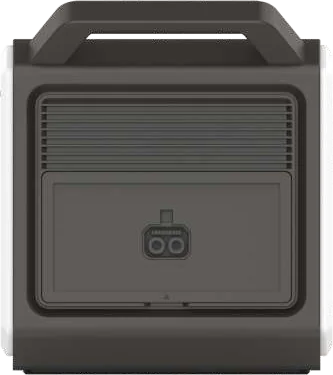
The M2200 datasheet shows 2 external battery ports: M2200 + 2 × P2200 = 6,720 Wh.
When an expansion battery is connected, the screen's expansion pack icon (indicator 1) is shown. Check expansion-battery availability and pricing with Silvera Solar Power. Neither battery appears on the current SRP flyer.
5. MARSTEK app (Bluetooth / Wi-Fi)
The manual says the MARSTEK APP connects to your devices via Bluetooth or Wi-Fi to track energy use and production in real time, show device status, and control the device. In the app you can set the no-load / light-load AC shutdown timer.
Download the app
Android: Google Play. iOS: App Store. You can also scan the QR code printed in the manual ("APP Instructions" page). The manual also prints a direct download link: https://eu.hamedata.com/ems/apk/marstek/index.html.
Open the app user guide
The manual's second QR code ("Scan the QR code to access the APP user guide") opens the step-by-step pairing guide. The manuals themselves do not list pairing steps.
Confirm the connection
The Bluetooth and Wi-Fi status icons (indicators 3 and 4) show the connection state. To pair with a new phone, long-press the LED display switch to reset the Bluetooth pairing information.
6. Storage
- If the unit won't be used for a long time, top up the charge every 3 months, keep the battery at 60–80%, and store it in a cool, dry place (manual).
- Storage temperature: −10 to 45 °C (manual and datasheet).
- Do not store it in direct sunlight for long periods, such as in a car or cargo bed.
7. Safety
- Supervise closely when the unit is used near children. Do not put fingers or hands into the product.
- Do not exceed the output rating. Overloads can cause fire or injury.
- Do not use it with a damaged cord, plug or output cable, or if the unit or a battery is damaged or modified.
- Do not disassemble it. Servicing must be done by a qualified person using identical replacement parts.
- Keep it away from fire. Temperatures above 130 °C may cause an explosion.
- Charge only in a well-ventilated area, and never block the fan or vents.
- Do not use it near strong static or magnetic fields, or flammable or explosive gas or smoke. Do not stand on it.
- Do not immerse it in water. If it falls into water, put it in a safe, open place away from fire until it is completely dry. Unlike the V500, the M-series has no IP rating in its documents.
- It is normal for the unit to feel warm while charging a device.
Air travel: the manuals' FAQ says no. The M-series cannot go on an aircraft, because it is well above the 100 Wh lithium-battery limit.
8. Warranty
The M1200 and M2200 manuals state a 5-year warranty from the purchase date ("Register Now to Get 5 YEARS WARRANTY!"). Proof of purchase may be required. Mechanical impact, unauthorized repair, misuse, and water, humidity or heat damage are excluded. Confirm current local warranty handling with Silvera Solar Power.
Related
- M1200 product page · M2200 product page
- Troubleshooting M1200 / M2200
- Brownout preparedness guide · Backup calculator
Sources
- MARSTEK M1200 User Manual (Drive): English section, plus the German/Italian sections for the indicator-2 conflict
- MARSTEK M2200 User Manual (Drive): English section
- MARSTEK M1200 datasheet (Drive): spec table and P1200-M expansion battery
- MARSTEK M2200 datasheet (Drive): spec table and P2200 expansion battery
- SRP flyer (Drive): "M1800"/"M2400" naming