V500 quick start
The MARSTEK V500 is described by its manual as a "Waterproof 500W/2kWh Solar Generator with 500W PV Input". It has one AC socket, an MC4 solar input, an AC input and a single ON/OFF button. No installation is needed. You plug in your loads, and you charge it from the wall, from solar panels, or from both.
This guide follows the official MARSTEK V500 User Manual step by step. Keep the printed manual with the unit. MARSTEK says it should be kept "until the end of the product's life cycle".
The V500 manual and datasheet both rate the AC input and AC output at 230 V / 50 Hz. The input voltage range is 184–276 V. Neither document mentions 60 Hz operation, but the Philippine grid runs at 60 Hz. Before you connect a V500 to grid power or to frequency-sensitive loads in the Philippines, check 60 Hz compatibility of the units you are selling with Silvera Solar Power / MARSTEK.
1. Unbox and check
Check the packing list
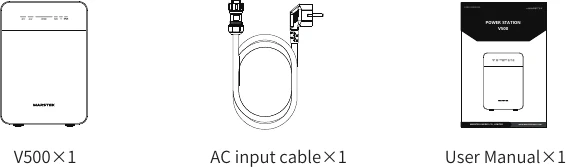
The box should contain V500 × 1, AC input cable × 1 and User Manual × 1. Solar panels and MC4 cables are not included.
Before first use, check that the housing, sockets and cable are undamaged. The manual says: "Do not use damaged or modified products or accessories."
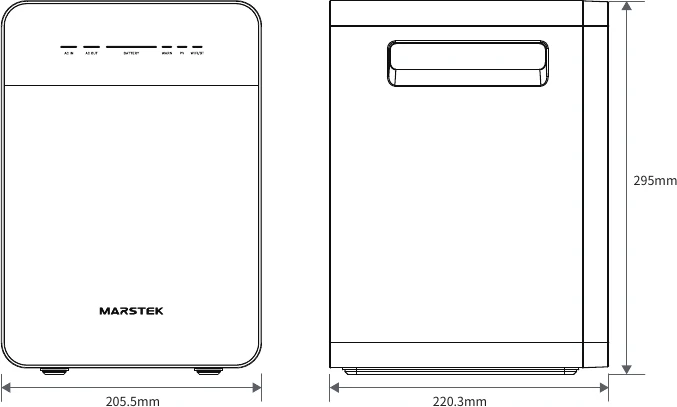
The appearance drawing (§1.2) shows the height as 295 mm. The specification table (§1.3) and the datasheet both give 205.5 × 220.3 × 290.0 mm. Quote 290.0 mm from the specification table, and check the real unit if the exact height matters (for example, for a cabinet fit).
2. Get to know the interface
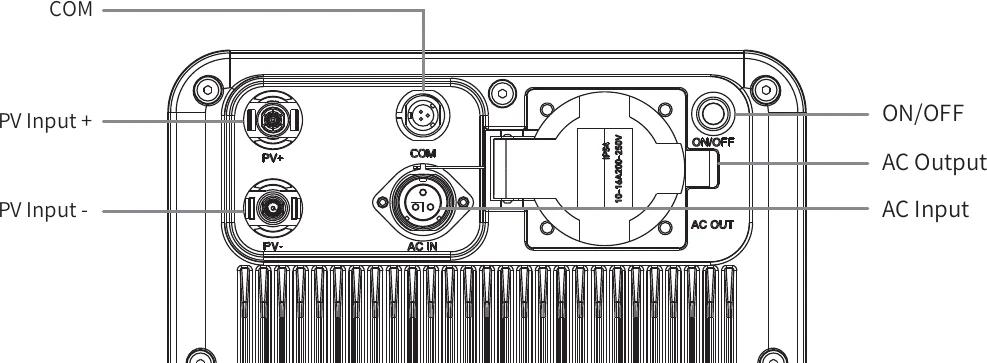
| Port / control | What the manual says |
|---|---|
| PV Input + / PV Input − | MC4 connectors. 500 W max solar input, 15 V start-up voltage, MPPT range 12–59 V, 16 A max current |
| AC Input | BC05 port. AC IN power 750 W, AC charge power 500 W max, AC bypass 500 W max, rated 230 V / 50 Hz, range 184–276 V, input current 3.3 A |
| AC Output | 1 socket, pure sine wave, 500 W continuous / 1,000 W peak, 230 V / 50 Hz, 2.2 A (2.8 A max) |
| COM | Labelled on the interface drawing. The manual does not describe what it is used for |
| ON/OFF | Power button (see Power on / off) |
| AC OUT flip cover | "Press from right to left to release the latch and open the flip cover. When closing, push the cover until the latch clicks into place." |
- Solar voltage: the manual says MPPT range 12–59 V. The datasheet says solar input voltage 12–60 V. Use 12–59 V as the safe value when you size panels.
- Cycle life: the manual's specification table says 6,000 cycles (down to 80% DoD). The datasheet says 10,000+ cycles (down to 80% DoD). See the V500 product page.
- Certificate: the manual's table prints "UN38.8". The datasheet lists "UN38.3 & MSDS". UN38.3 is the standard lithium-battery transport test, so "UN38.8" is probably a typo. Quote the datasheet.
The V500 is rated IP65. Close the AC OUT flip cover until it clicks whenever the socket is not in use, especially outdoors.
3. Read the LED panel
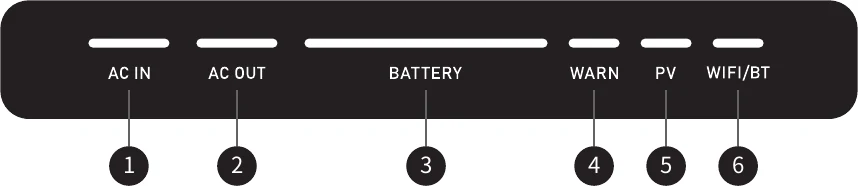
| # | LED | Meaning |
|---|---|---|
| 1 | AC IN | Lights up when AC input is present |
| 2 | AC OUT | Lights up when AC output is turned on |
| 3 | BATTERY | Shows state of charge (SOC) in 4 bars (see the next table) |
| 4 | WARN | Lights red when a fault occurs (see V500 troubleshooting) |
| 5 | PV | Lights up when PV (solar) input is present |
| 6 | WIFI/BT | Lights up when the Wi-Fi and Bluetooth connections are normal |
Battery bar: SOC levels
| Bars lit | State of charge |
|---|---|
| 1 bar | 0–25% |
| 2 bars | 26–50% |
| 3 bars | 51–75% |
| 4 bars | 76–100% |
During charging, the highest lit bar blinks. The manual's example: at 36% SOC while charging, the first two bars (left to right) are lit and the second bar blinks.
4. Power on and off
Power on
When the unit is off, the front LEDs and the ON/OFF button are dark. Briefly press ON/OFF to turn it on, and the front LEDs light up.
Note: if you start charging the V500 while it is off, the V500 also turns on.
Before powering off: disconnect inputs
Disconnect AC IN, PV+ and PV− first. The device cannot be powered off while any of them is connected. Also make sure the connected load can be safely switched off.
Power off
Press and hold ON/OFF until the green light around the button goes out, then release. The front LEDs turn off and AC OUT stops output.
5. Charging and discharging modes
Charge-only mode
| Charging source | Charging power (per manual §4.2) |
|---|---|
| AC IN only | 500 W |
| PV only | Depends on the solar panel (500 W max input) |
| AC IN + PV (dual) | 750 W total |
How dual charging splits the power: if the panels supply enough power, PV is capped at 500 W and AC IN is set to 250 W, for 750 W in total. If PV supplies less than 500 W, AC IN increases to keep the total at 750 W.
The V500 manual does not give charge times. To estimate one, divide the capacity by the charging power. For example, 2,009.6 Wh ÷ 500 W ≈ 4 h, and real charge times will be longer. This figure is an illustrative calculation, not a MARSTEK figure.
Discharge-only mode
When the V500 is on, it outputs 230 V / 50 Hz through the AC OUT socket. You can connect loads within 500 W (rated power).
"Do not allow the V500 to power loads exceeding 500W in rated power. Overloading will cause the V500 to stop operation and enter a protective state." Check the rated watts on each appliance's nameplate before you plug it in. 1,000 W is a short-term peak rating, not a running rating.
Simultaneous charging and discharging
| Connected | What happens (manual §4.4) |
|---|---|
| AC IN + load | Full bypass mode: utility power supplies the load (AC bypass 500 W max) |
| PV + load | PV supplies the load. The battery covers any shortfall |
| AC IN + PV + load | Utility power supplies the load while PV charges the V500 battery |
6. MARSTEK app
The manual says the MARSTEK App connects to your devices via Bluetooth or Wi-Fi to track energy consumption and generation in real time, show live device status, and control energy management. Supported phones: Android 6.0 or higher and iOS 12.0 or higher.
Download the app by QR code
Scan the QR code for your phone, as printed in §5.1 of the manual:

Open the app user instructions
Section 5.2 of the printed manual has a third QR code that opens "the user instructions for MARSTEK App (Version V500)". Scan it from the manual for the pairing steps. The V500 manual does not describe the pairing steps itself.
When the connection works, the WIFI/BT LED lights up. The manual warns that the app is continuously updated, so its screens may differ from the manual.
7. Transport
From manual chapter 3 (these rules add to local regulations, they do not replace them):
- Carry it by the non-slip handles. Do not drag it by cables or connectors, and do not carry it upside down or on its side.
- Do not throw or drop it from more than 0.5 m. On stairs, support it steadily.
- Do not leave it in direct sun for long periods, such as inside a vehicle or on an open-bed truck (thermal-runaway risk).
- Keep it away from rain, seawater and other liquids while in transit. Use rain-proof and moisture-proof packing.
- Do not charge it or run loads during transport.
- Do not stack it with sharp metal or heavy items. Do not ship it with flammable, explosive, corrosive or strongly magnetic items.
- Do not remove the battery pack and transport it separately.
8. Storage
| Rule | Value / action |
|---|---|
| Storage temperature | −20 °C to 60 °C, relative humidity ≤95% non-condensing |
| Location | Dry, ventilated, indoor, no direct sun, away from heat sources and strong EMI sources |
| SOC before storage | 50–60% |
| Long-term storage | Recharge every 1–2 months to keep 50–60%, then disconnect the charger (avoid continuous float charging) |
| Before storing | Switch off all inputs and outputs and disconnect all cables |
| Position | Upright. Not upside down, on its side, or stacked |
| Avoid | Damp, dusty or corrosive-gas places. The manual names basements and coastal areas |
The manual lists coastal areas among the places to avoid for storage. Many Batangas customers live near the sea, so tell them to store the unit indoors, dry and ventilated, away from salt spray.
After long-term storage: check the housing and connectors, recharge to above 80% SOC while watching for abnormal heat or noise, then test AC OUT and PV input before normal use.
9. Routine maintenance
- Use the unit only within the conditions in the specification table: operating temperature −10 °C to 50 °C, charging 0 °C to 50 °C, altitude ≤ 4,000 m. Do not expose it to harsh weather.
- If it malfunctions, stop using it until the issue is resolved. See V500 troubleshooting.
- Inspect it at least once every six months. Cooling components must not be blocked. The V500 uses natural (fanless) cooling.
- Clean with a dry soft cloth only, never with organic solvents (acetone, alcohol) or harsh detergents.
- Do not open the unit. The manual says repairs must go to qualified personnel, and its labels warn of internal high voltage and a 5-minute capacitor discharge wait.
Keep it away from children and open flames. Never expose it to temperatures above 130 °C. Do not pierce, strike or stand on it. If you notice leakage or an unusual smell, move it away from all ignition sources immediately. Use only MARSTEK-recommended accessories.
Warranty
The V500 manual says the warranty period is set by the warranty card enclosed with the product, starting from the purchase date (keep the receipt). Cosmetic damage, unauthorized disassembly, human-caused faults and force majeure are excluded. For current local warranty terms, ask Silvera Solar Power.
Related
- V500 product page
- V500 troubleshooting and alarm codes
- Brownout preparedness guide
- Backup calculator
Sources
- MARSTEK V500 User Manual (Drive): §1.1–1.5, ch. 3, 4, 5, 6
- MARSTEK V500 datasheet (Drive): used for the conflicts noted above